

The floor & the counter, one system.
Autonex follows a vehicle from the moment it is signed in at your gate to the moment the invoice is handed over — carrying the job card, the technician, every spare issued off your shelf and the tax treatment of the bill, without anything being entered twice.
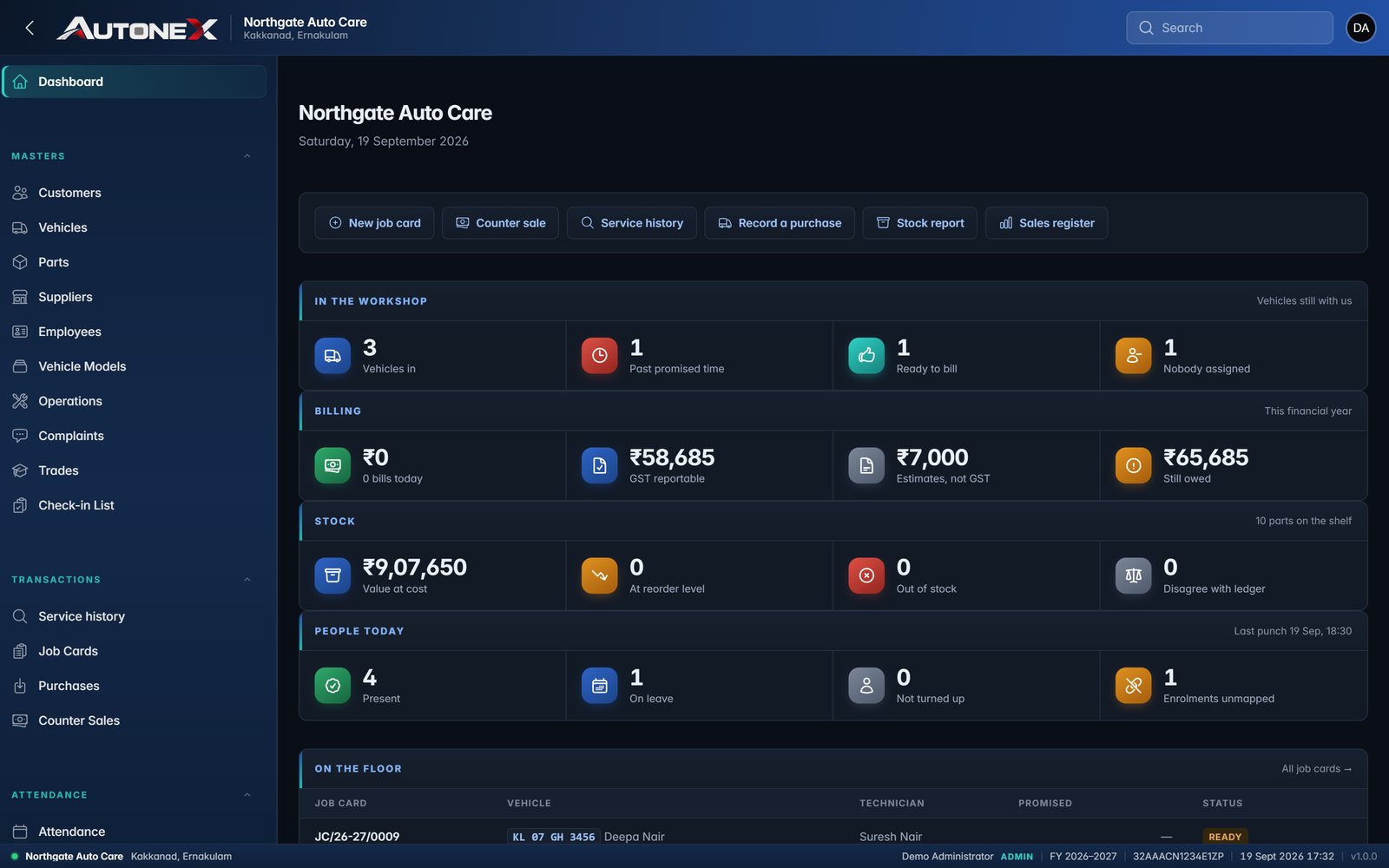
A service centre lives on two things it cannot get wrong.
Knowing what is actually on the shelf, and handing the customer a bill that is correct the first time. Both are simple until the day is busy — and then the spare issued at eleven o'clock is remembered at six, the job card is on a clipboard in bay three, and the invoice number is whatever the book says next.
Autonex closes that gap by making the workshop floor and the billing counter the same system. A spare leaves stock the moment a technician issues it to a job card, not when someone remembers to bill it. A job card is numbered when the vehicle is signed in, because that is when it is signed. And the tax invoice is assembled from work already recorded — so the bill is a consequence of the day, rather than a reconstruction of it.
Gate to Counter, One Record
Sign-in, job card, technician, parts issued and tax invoice are one chain — nothing is keyed twice.
Stock You Cannot Type Over
Stock on hand is the sum of an append-only ledger — not a number a user can edit to make it agree.
Built for the Statutory Parts
Gapless numbering, CGST/SGST/IGST bifurcation and HSN summaries are built in, not bolted on later.
"Autonex — where the work on the floor and the bill at the counter finally tell the same story."
The job card is the spine.
A vehicle is signed in and numbered. Complaints are recorded against a catalogue you control, operations are allocated to technicians, and every spare drawn from stores attaches itself to that card.
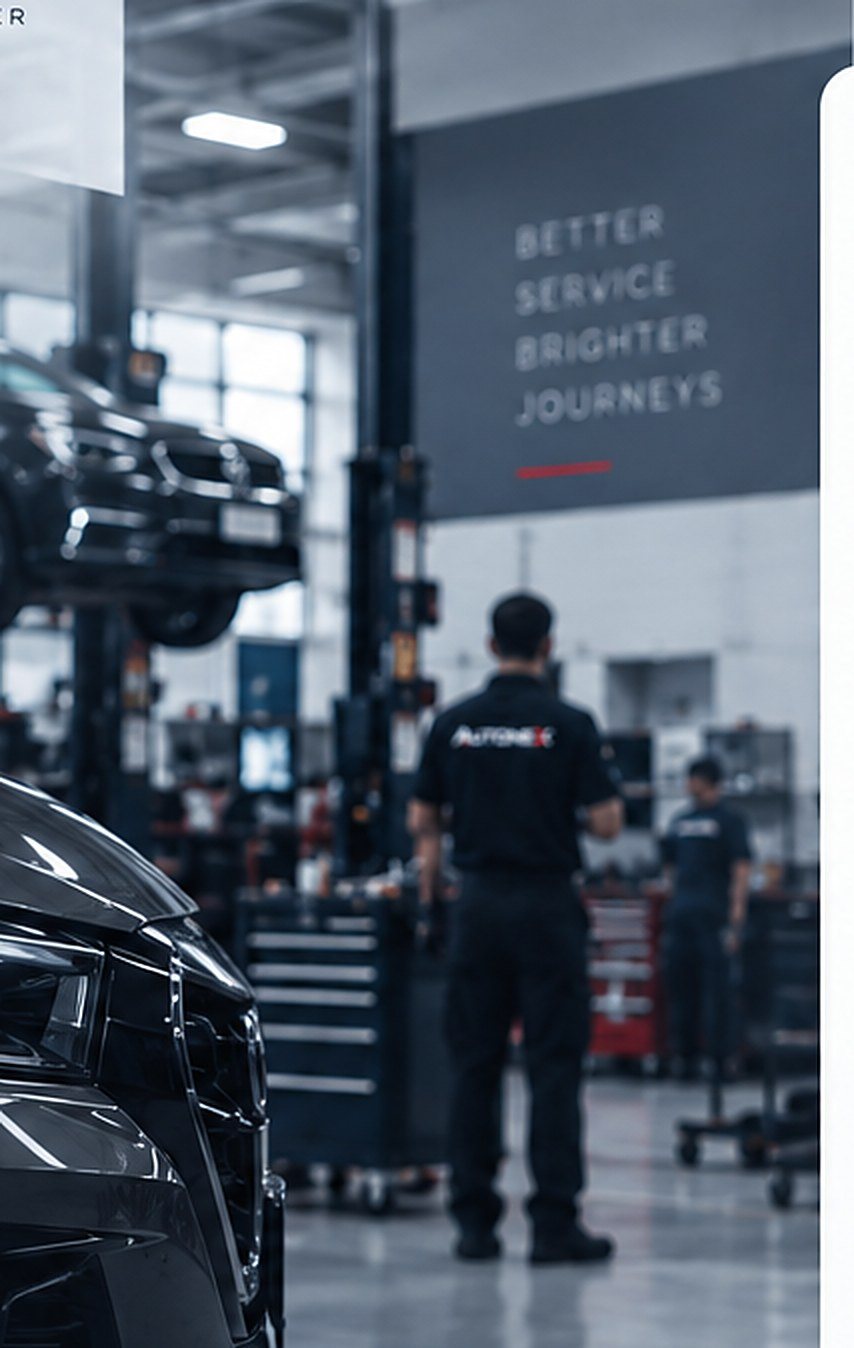
The life of one vehicle
Job Cards
Numbered at sign-in, with odometer in and out, promised time, advisor and estimate approval all on the record.
Technician Allocation
Work assigned operation by operation, matched to the skills an employee holds and their availability that day.
Complaints Catalogue
Customer complaints chosen from a list you maintain, so the same fault is described the same way every time.
Operation Templates
Standard jobs carry their own labour rate and time, so two advisors quote the same work at the same price.
Vehicles & Owners
Every vehicle belongs to a customer, with make, model and chassis held against a registration number that stays unique.
Service History
Type a registration number and read back every visit, every operation and every part, for as long as you have used it.
Job Card Photos
Condition at sign-in captured against the card — the answer to a dispute about a scratch nobody remembers.
Accessories Check-In
What came in with the vehicle, recorded and timestamped, so what goes back out is not a matter of memory.
A job card moves through six states — open, in progress, ready, invoiced, closed and cancelled — and a cancelled card reverses its parts back into stock rather than quietly disappearing.
Screens throughout this page are captured from a running Autonex installation. The workshop, vehicles and people shown are sample data — your business name, registration and records replace them.
One ledger behind everything.
Purchases, counter sales and job-card issues all post to the same stock ledger. Stock on hand is its sum — it is never a figure someone typed in.
Every movement names its reason and its document
Three things move stock, and each one posts to the ledger as it happens — never afterwards, from memory. Rows are never edited or deleted; a correction is a new, opposite row, so a cancelled document puts its parts back rather than erasing the fact that they left.
Parts Master
Part code, description, unit, HSN, GST rate, purchase and sale rate, reorder level — searchable by code or description.
Purchases & Suppliers
Supplier invoices captured line by line, with the tax treatment recorded as bought, not as assumed later.
Counter Sales
A part sold over the counter without a job card still leaves the same ledger — one stock figure, not two.
Append-Only Movements
Enforced in the database itself. A movement row cannot be updated or deleted, even by someone with direct access.
Stock Report
Opening, what came in, what went out and closing — per part, over any period you choose, with reorder levels alongside.
Movement by Reason
Used on jobs, sold over the counter, returned to supplier, adjusted — a closing balance you can derive is one you can defend.
Traceable to Source
Every movement names the document behind it — so "where did these four go?" has an answer, not a theory.
Drift Checks
Cached stock figures are reconciled against the ledger, so a discrepancy is caught by the system before it is caught by a count.
Two documents, deliberately kept apart.
Before work is approved a customer wants a figure; once it is done they need a bill. Those are different documents and the law treats them differently. Autonex keeps them on separate gapless series, printed from different templates and sharing one stock ledger — and an approved estimate becomes the tax invoice without consuming stock twice.
An estimate is a quotation, not a bill — no supply has taken place, so it carries no tax and stays out of your GST figures, a rule the database enforces rather than a screen. Once the work is approved and done, the tax invoice is raised, and that is the document your return sees. A site not registered for GST cannot raise a tax invoice at all, and Autonex will not let it try.
Gapless Numbering
Per series, per financial year. An abandoned bill does not burn a number, and the series refuses to be wound backwards once issued.
Per-Line Tax, Not Per-Bill
Parts and labour at their own rates on one bill, each line taxed on its own footing and summarised by HSN.
Intra- & Inter-State
CGST and SGST on local work; IGST applied automatically for an out-of-state customer. The two can never appear together.
Three GST Modes
Regular, composition or unregistered — set once for the installation, and the bills follow it from then on.
Finalised Means Frozen
A finalised document snapshots its party and tax details and stops being editable — the bill you printed is the bill that is stored.
Print & PDF
Bills print to PDF carrying your logo, legal name and registration exactly as the GST department holds them.
Series Continuation
A workshop already trading arrives with a number reached. Autonex continues from it — restarting at 1 is the one cutover mistake an auditor always notices.
Sales Register
Turnover by financial year with taxable set against non-taxable — ready to be handed to whoever files your return.
Keep the terminal already on your wall.
Punches are read straight from a biometric device into Autonex. Four different ways of talking to a terminal are supported, so the deal does not stall on hardware you would rather not replace.
Push / ADMS
The terminal posts each punch to Autonex over HTTP as it happens — the standard most wall units already speak.
Pull over TCP
Autonex connects to the device on the local network and collects punches on a schedule.
File Watch
For terminals whose only output is an exported file — dropped in a folder, picked up automatically.
Vendor Database
Where the vendor's own software already stores punches, Autonex reads them from its database directly.
Punches Cannot Be Edited
Append-only, like the stock ledger. A register that can be quietly corrected is not a register.
Daily & Monthly Registers
Worked hours per employee per day, and a monthly sheet you can print or hand to payroll.
Employees, Skills & Leave
The same employee record that holds leave also holds the skills used to allocate work on the floor.
The same system on whatever is in your hand.
Autonex is one web application, not a desktop program with a cut-down phone version bolted on. The office runs it on a PC, a service advisor carries it on a tablet, and a technician in the bay opens the same screens on a phone — nothing to install, and no second app to keep in step.
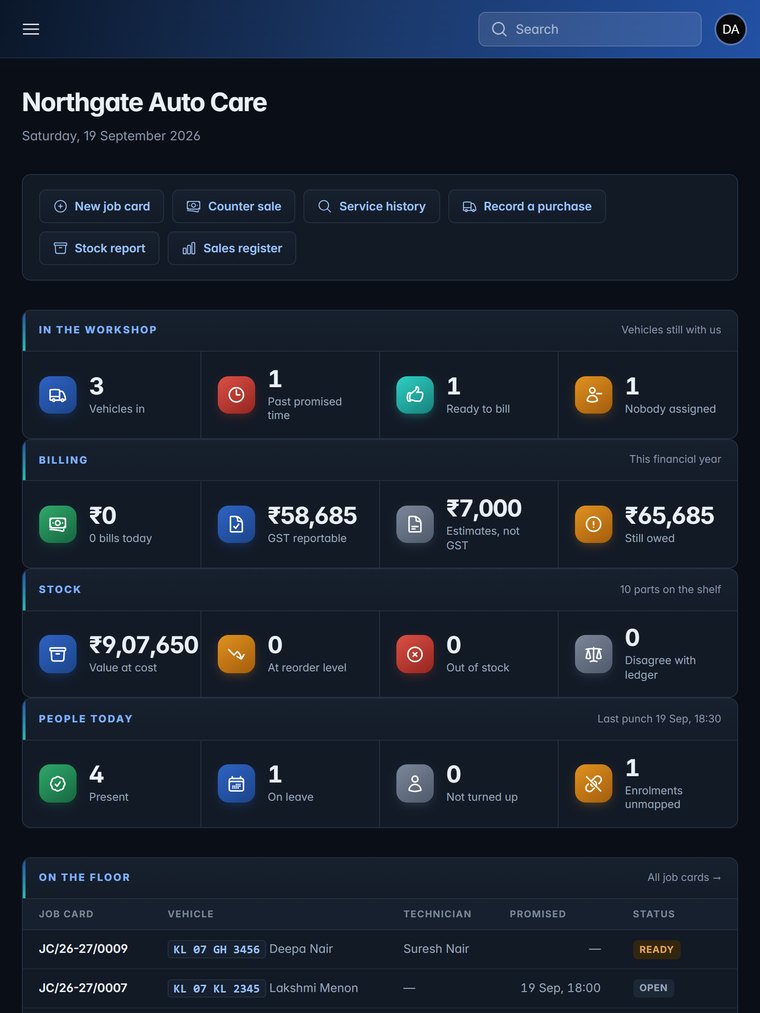
On a tablet — the navigation folds away and the day's figures stay four across. The screen a service advisor walks the floor with.
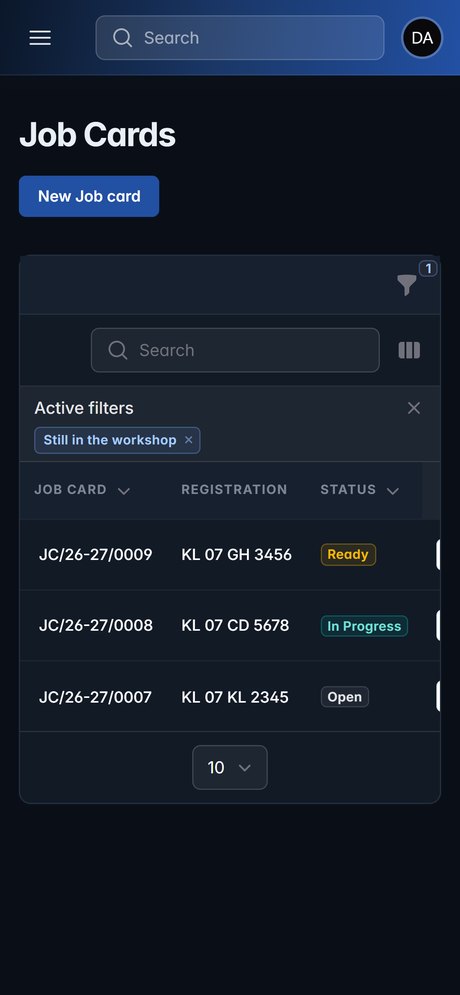
Cards in the bay
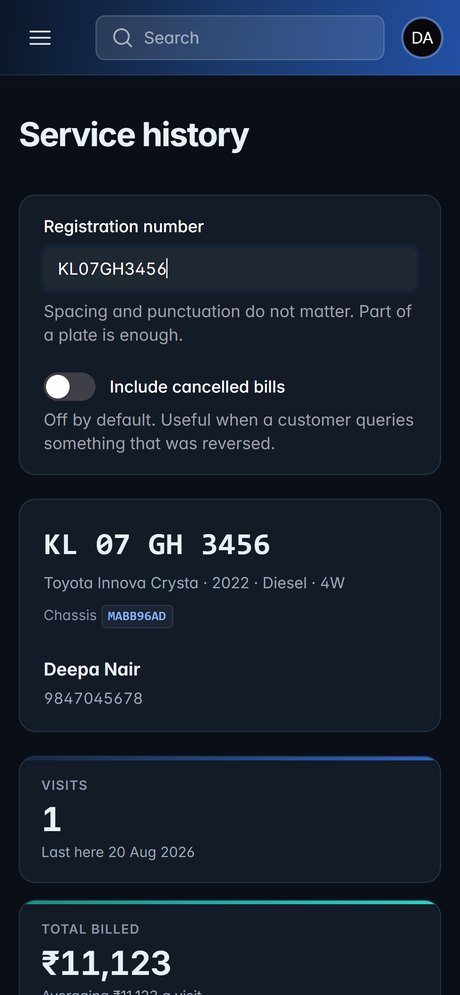
History at the counter
Columns drop, they do not shrink
A register squeezed onto a phone is unreadable, so Autonex does not squeeze it. Each table decides which columns matter at each width — on a phone the job card list keeps the number, the registration and the status, and hides the rest until there is room. The same is true of the billing and stock registers.
One Application
Phone, tablet and PC open the same address and see the same live data — there is no separate mobile build to fall behind.
Nothing to Install
A browser is the whole requirement. Adding a machine to the workshop means opening a page on it, not provisioning it.
Built for Thumbs
Buttons and rows are sized to be hit with a thumb, by someone whose hands are not clean, without zooming in first.
Their Own Login
Every person gets a named account with a role, so what a technician can reach on a phone is not what the counter can reach.
Technology & Security.
Application
Operator UI: Filament v5 (Livewire + Alpine.js)
Database: PostgreSQL
Printing: Server-side PDF for every document
How It Runs
On-premise or cloud: a server box in the workshop that keeps working through an internet outage, or Eway cloud hosting over HTTPS
Install-time wizard: one installer, your business facts entered once
Data Integrity
Autonex is covered by a test suite we run before every release — one part proves the billing, stock and job-card logic behaves, the other runs against the database and proves it refuses bad data even when the application is bypassed entirely.
The same complete build, whatever your size.
Autonex ships the same product to every site — a smaller garage is not sold a crippled version with features held back. Only the price follows the size of the operation.
Not included: hardware (biometric terminal, printer, computers, networking), accounting and payroll integration, and GST return filing — Autonex produces the figures; filing stays with your accountant.
Purchase order to go-live in 3–4 weeks.
Go-live is targeted at the first of a month, never mid-month, so your first GST return under Autonex covers a whole period. During the parallel run you raise real job cards in Autonex alongside your present method — nothing is at risk on the day you switch.
Why Autonex?
Purpose-Built for Workshops
Not a retail billing package with a job card bolted on. The job card, the bay and the stores are the design.
A Record You Can Stand Behind
When an auditor, a customer or your own accountant asks a question six months later, the answer is in the system.
Configured, Not Customised
One installer, your business facts entered in a wizard — four-wheeler service centre, two-wheeler garage or both.
Your Data Stays Yours
Exportable at any time. We will hand over a full database copy on request, in a standard format, at no charge.
Autonex is a proprietary platform developed and maintained by eway infratech LLP, continuously enhanced for reliability, scalability and long-term support. It is not a generic billing tool — it is a workshop management system built for how a service centre actually runs.
Ready to see it live?
Book a guided walkthrough for your management team — a vehicle taken from sign-in to job card to tax invoice on screen, the stock ledger behind it, and a full feature overview.